Hey everyone, if you or your kids play Minecraft, then you already know that skins are a huge part of the fun. In 2026, Minecraft skins continue to be one of the most popular ways for players to express their personality, show off their creativity, and stand out in multiplayer worlds. Whether you’re building massive mega-bases, surviving hardcore mode, or just hanging out with friends on a public server, having a cool skin makes the entire experience more enjoyable. From classic Steve and Alex to thousands of custom designs, skins have evolved into a massive community-driven culture. Today, I’m breaking down everything you need to know about Minecraft skins — how they work, where to get the best ones, how to create your own, and tips every parent and player should know.
What Exactly Are Minecraft Skins? A Minecraft skin is basically the appearance of your player character. It’s a 64×64 pixel image (or 64×32 for older legacy skins) that wraps around the 3D model of Steve or Alex. Skins change how your character looks — clothes, hair, accessories, armor style, even facial expressions. In 2026, skins have become incredibly detailed thanks to better tools and higher-resolution support on many servers. You can look like your favorite superhero, a realistic person, an anime character, a meme, a YouTuber, or even your own original creation. The best part? Most skins are completely free, and changing your skin is super easy on both Java and Bedrock editions.
How to Change Your Skin in Minecraft 2026 Changing your skin is straightforward. On Minecraft Bedrock Edition (mobile, console, Windows), open the game, go to Profile → Skins, and either choose from the default pack or import a new one. On Java Edition, log into the official Minecraft website, go to your account settings, upload the skin file, and restart the launcher. Many players now use third-party launchers like Prism Launcher or the CurseForge app, which make switching skins even faster. Pro tip: always save your favorite skins in folders on your computer so you can switch them quickly depending on the server or mood.
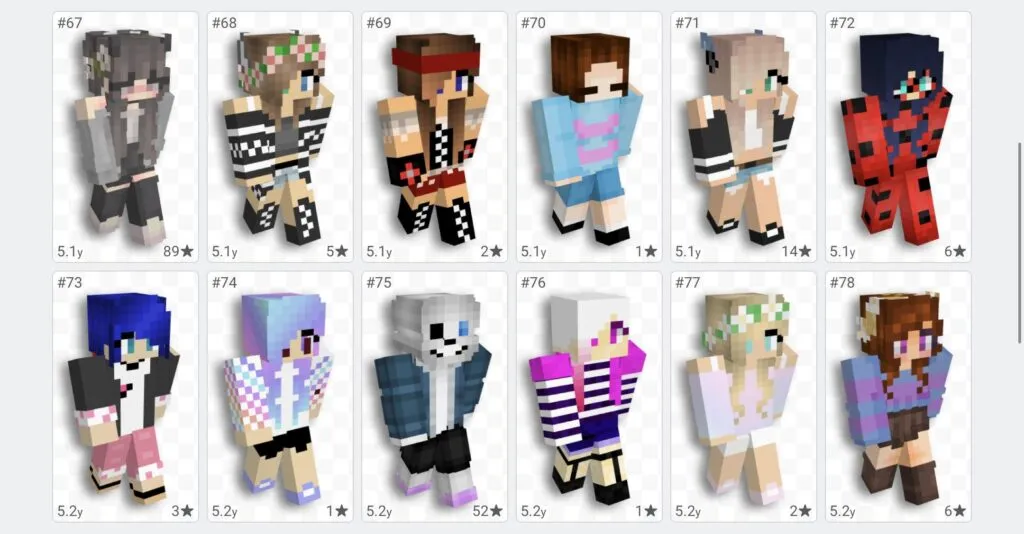
Popular Minecraft Skin Trends in 2026 This year, we’re seeing some clear favorites across the community. Realistic skins are huge right now — hyper-detailed faces that almost look like real people. Anime and cartoon-style skins are still extremely popular, especially among younger players. Meme skins (like the “Ohio” or “Skibidi Toilet” characters) come and go quickly, while fantasy-themed skins — wizards, warriors, cyberpunk ninjas, and mythical creatures — never go out of style. YouTuber skins inspired by Dream, MrBeast, or popular Minecraft creators are also very common. Many players love matching group skins when playing with friends, such as full superhero teams, Minecraft movie characters, or themed survival squads.
Best Places to Download Minecraft Skins There are several trusted websites where you can find thousands of high-quality skins in 2026:
- NameMC (still the biggest and most reliable)
- Planet Minecraft
- MinecraftSkins.com
- The Skindex
Always check the download count and recent comments before using any skin. Some servers and realms now have their own official skin databases, so you can browse and apply skins directly inside the game. For Bedrock players, the Minecraft Marketplace offers official skin packs created by Mojang and popular creators, though these usually cost Minecoins.
How to Create Your Own Minecraft Skin Creating a custom skin is easier than ever. The best free tool in 2026 is the official Minecraft Skin Editor on the website, but many players prefer NovaSkin, Blockbench, or The Skindex editor. You start with a template, paint every part of the character using the pixel editor, and download the file when finished. Advanced creators use layered designs, custom HD skins (with special mods on Java), and even animated cape effects. If you’re not artistic, you can use AI skin generators that are getting really good this year — just describe what you want (“cyberpunk cat girl with neon hair”) and it creates a base skin you can edit.
Free vs Paid Skins – What’s Worth It? The majority of amazing skins are completely free. However, official Marketplace packs often include exclusive animations, matching capes, and emotes that you can’t get anywhere else. For most casual players, free community skins are more than enough. Just be careful when downloading — only use well-known sites to avoid malware or stolen artwork.
Safety Tips for Parents If your kids are using custom skins, it’s smart to supervise the websites they visit. Teach them not to use skins with inappropriate images or usernames. Many schools and family servers now require “appropriate skins only.” Enabling Microsoft account settings and using child accounts gives extra control. On the positive side, making and sharing skins is a fantastic creative outlet that helps kids learn digital art and design skills.
Why Skins Matter So Much in Minecraft Skins aren’t just cosmetic — they help players feel ownership over their character. Walking into a server with a unique skin instantly makes you feel more confident and part of the community. They also encourage creativity and self-expression. Many long-time players have signature skins they’ve used for years and even update them as they improve their design skills.
Minecraft skins are one of the simplest yet most powerful ways to make the game feel fresh in 2026. Whether you’re rocking a classic look or a crazy custom creation, your skin says something about who you are in the blocky world.
What’s your favorite Minecraft skin right now? Did you make it yourself or download it? Are you a parent whose kids are obsessed with certain skins? Drop your answers and skin ideas in the comments — I read every single one and might feature some of the coolest suggestions in a future post!